
Manage controls and evidence
Assign a control owner, request or submit evidence, and record an internal review in the Compliance Portal.
Define the control
- In the Compliance Portal, open Compliance & audit → Controls and choose Create control.
- Give the control a clear title. In Requirement and review guidance, describe what must happen, how often it should be checked, and what would show that the requirement was met.
- Choose a Control owner, set the Review due date, and select the applicable frameworks and declared status.
- Choose Create control. You can open it later from the Control library to review its details and linked evidence.
For example, a privileged access control might require an owner to review all production administrator accounts every quarter and record which access was approved or removed.
Request or submit evidence
Open Compliance & audit → Evidence. If someone else needs to collect the material, choose Request evidence, select the primary control and evidence owner, and set the Evidence due date. In Requested material and acceptance criteria, tell the owner which systems and dates to cover and how to judge completeness. Choose Create request, then share the request with the owner through your usual channel.
If you already have the material, choose Add evidence. To complete an existing request, open it and choose Submit evidence. Fill in Evidence summary and scope, add an optional source link or attachment, and choose Submit for review. When the same material supports several controls, use Collection context & reuse to link additional controls to the evidence record.
Review a submission
Open an In review record in the Evidence library. Compare the Acceptance checks and Collection context with the Supporting material. Check source access with the people who need to review it.
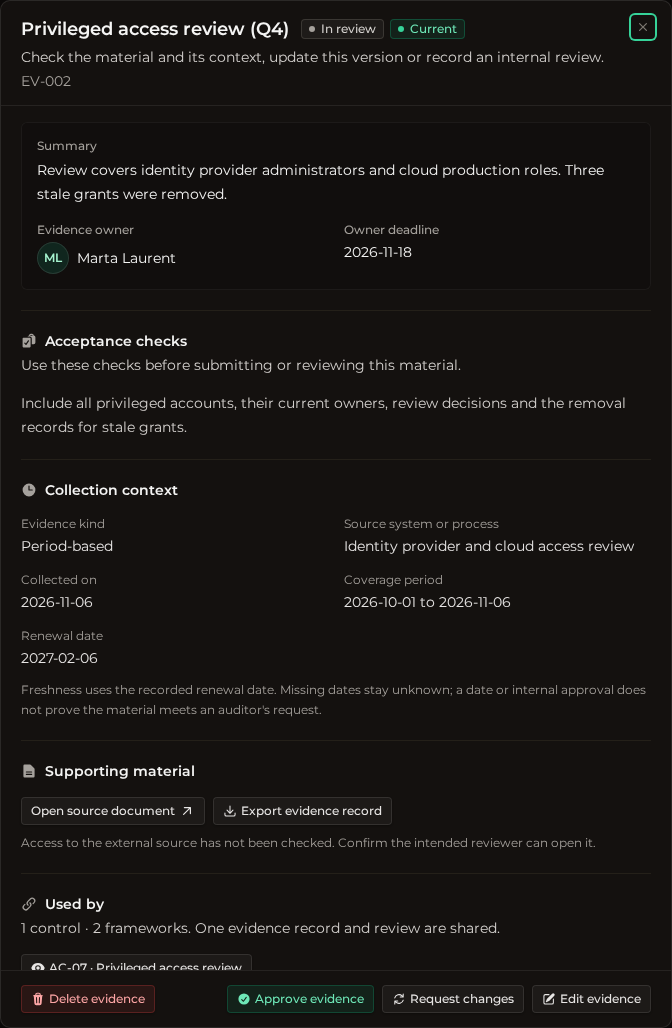
Choose Approve evidence if it meets the request. Choose Request changes and describe what the owner needs to supply or correct if it falls short. The Review decisions section keeps the history. Verified records the internal review. An auditor makes their own acceptance decision.
When your evidence is in place, review preparation gaps and export an audit handoff.
Was this helpful?